Solution overview
A multi-agent architecture built entirely on the Microsoft stack — from Teams to SharePoint, powered by Azure AI Foundry.
Architecture
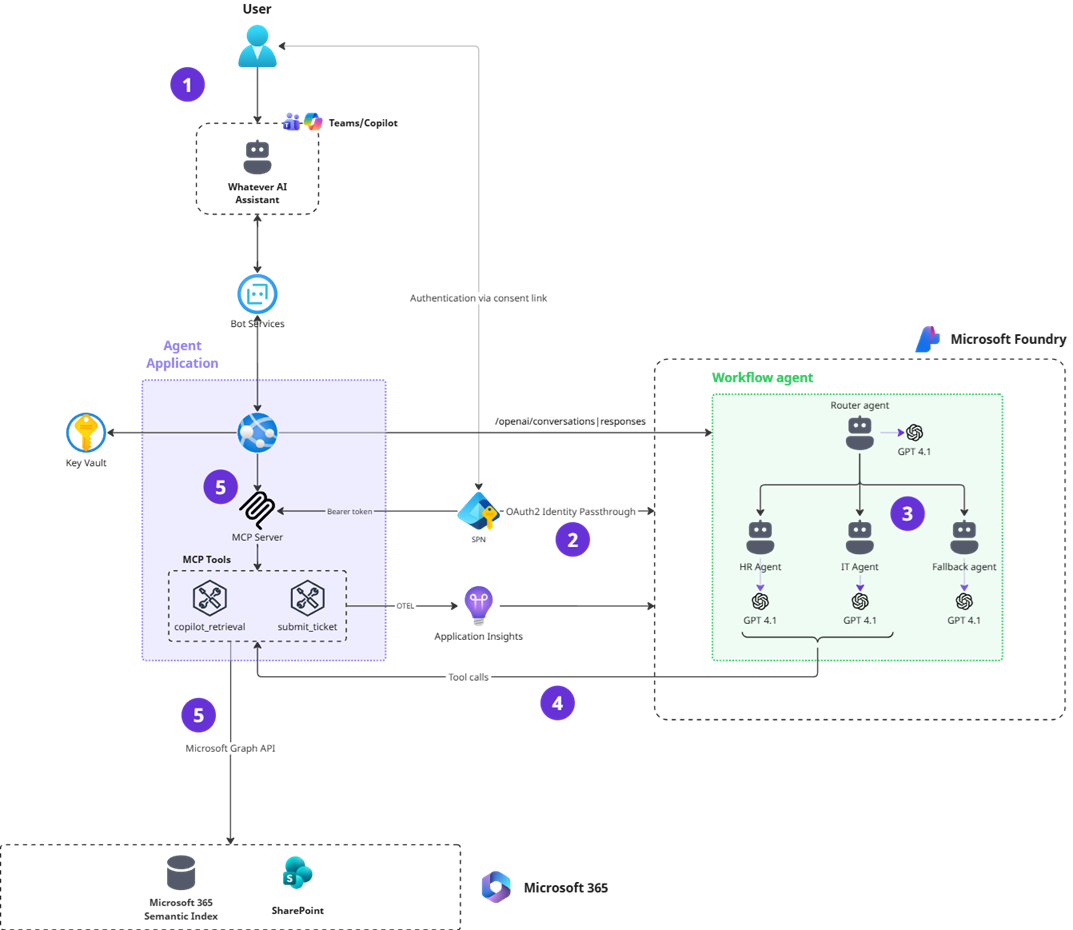
This architecture relies entirely on the Microsoft stack — Azure AI Foundry, Microsoft Graph, SharePoint, Microsoft Teams and Microsoft 365 Copilot.
Data flow
① Conversation start
The user opens a new session with the agent through Microsoft 365 Copilot Chat or Microsoft Teams.
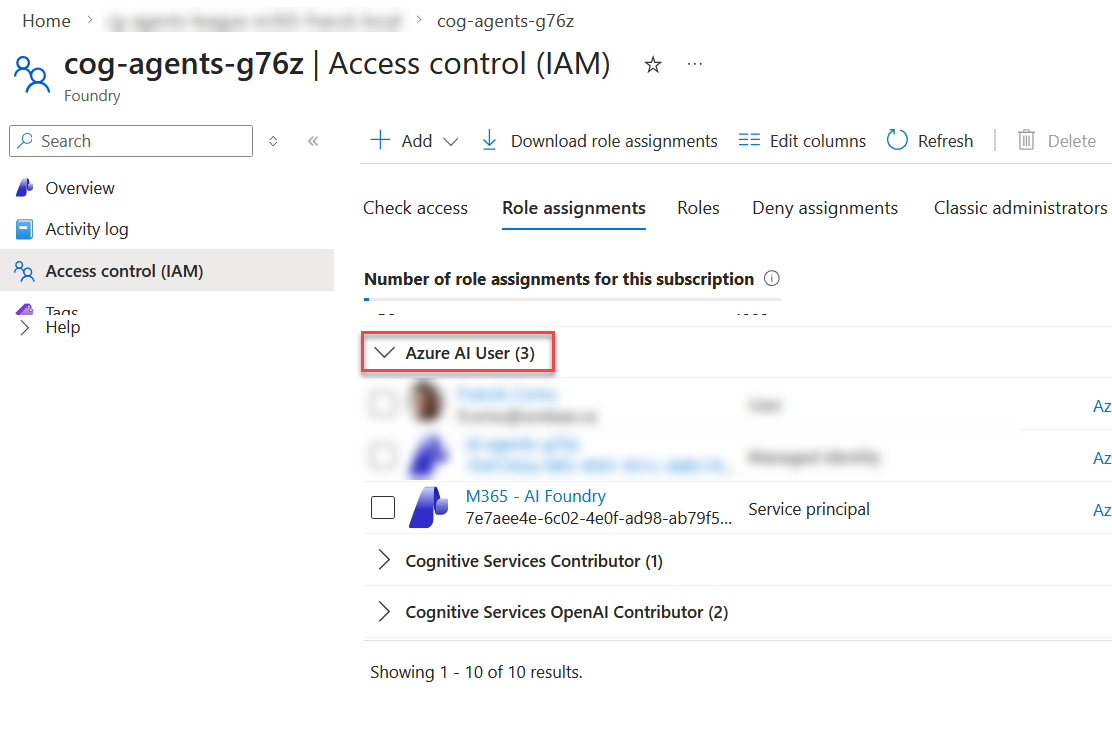
Behind the scenes, the agent application connects to the Foundry project resource using a managed identity and opens a new conversation with the workflow agent via the OpenAI Responses API (through the Foundry SDK).
For local development testing, you can't use a managed identity but a client ID / client secret. When interacting with Foundry resources and agents, the identity (managed identity or SPN) requires at least the Azure AI User role assignment:
② Authentication & consent
The message is routed to the workflow agent in Azure AI Foundry. If this is the user's first interaction, the MCP server triggers a consent flow to authenticate the user. Authentication is handled externally by the Foundry Agent Service using OAuth.
Note: there is currently no technical mechanism to programmatically detect authentication success.
③ Intent classification & routing
Once authenticated, the user continues the conversation in Copilot or Teams. The original question is sent to the workflow agent, which starts with the router agent. The router classifies the user's intent and forwards the question to the appropriate specialized agent:
🖥️ IT Agent
IT policy-related questions
📋 HR Agent
HR policy-related questions
🛡️ Fallback Agent
Anything outside IT or HR scope
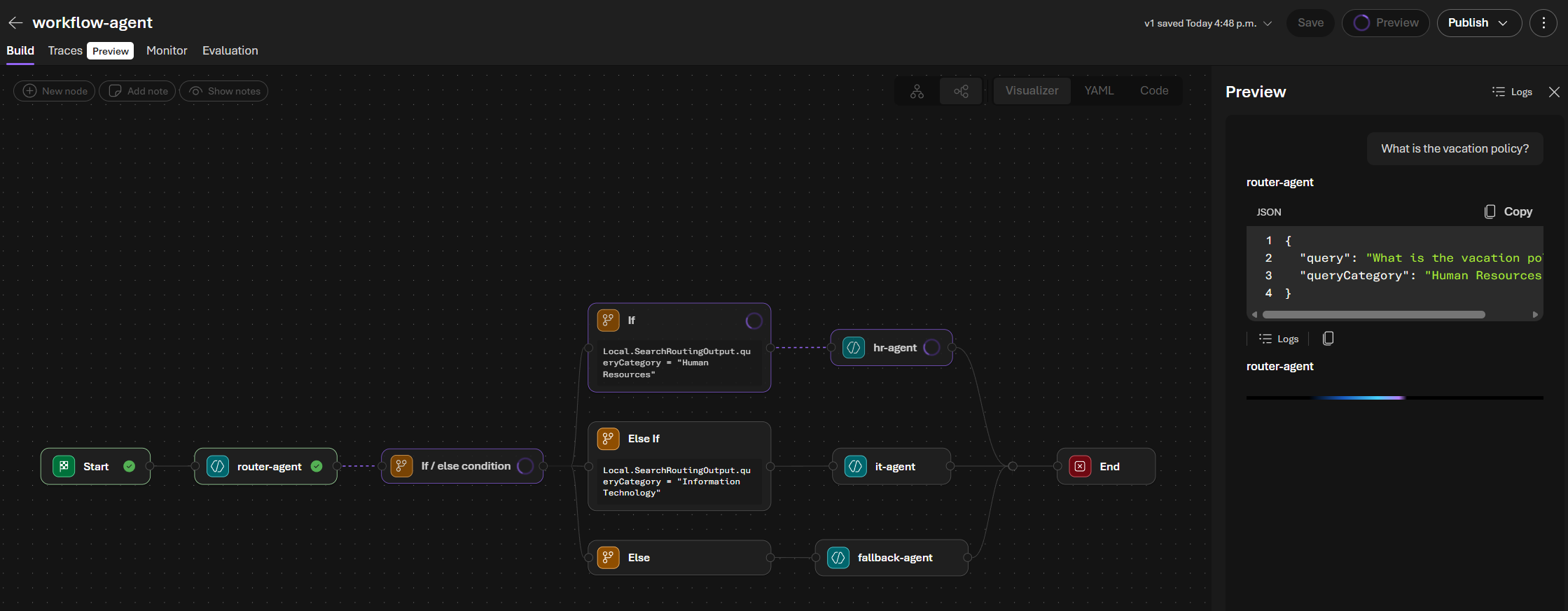
Each agent has specific instructions and parameters. For instance, HR and IT agents search for information in different SharePoint paths, and only the IT agent has the ability to submit tickets.
④ Knowledge retrieval & ticket submission
The IT or HR agent calls the copilot_retrieval tool to search for relevant policy documents in SharePoint. The agent then answers the question grounded in the retrieved content. If no verified answer is found, the IT agent proactively offers to raise a support ticket. If the user accepts (or directly requests one), the agent calls the submit_ticket tool to create a ticket in a SharePoint list.
MCP Tools
copilot_retrieval
Retrieve data for grounding purposes for Human Resources and Information Technology topics.
| Parameter | Type | Description |
|---|---|---|
| queryString | string | User query optimized for keywords search |
| filterExpression | string (optional) | Filter expression for search. For SharePoint documents, use Path:"https://mytenant.sharepoint.com/sites/mysite/Shared%20Documents/MyFolder*" |
| dataSource | enum: sharePoint | externalItem | Type of item to search for. Use sharePoint for documents, externalItem for external data sources. Default: sharePoint |
| connections | string[] | Array of connection IDs for external data sources. Use only when dataSource is externalItem. Default: [] |
| language | enum: fr-FR | en-US | null | Language of the input query. fr-FR for French, en-US for English. Use null if undetermined. Default: null |
submit_ticket
Create an IT support ticket to report an issue. The agent always gathers all required information — including severity level — before submitting.
| Parameter | Type | Description |
|---|---|---|
| subject | string | Subject of the issue |
| details | string | Details describing the problem more in-depth |
| severity | enum: Critical | Medium | Low | Severity level of the issue |
Using the Agent Service OAuth Identity Passthrough feature, the MCP requests contain the necessary Bearer token for the authenticated user to call the Microsoft Graph APIs on their behalf. A claims-based JWT validation is performed to verify the token (expiration time, audience, tenant ID, and issuer) — signature verification is not possible because Microsoft Graph tokens use a nonce-based signing scheme that prevents third-party cryptographic validation.
Each agent has its own tool configuration and parameter values (e.g., different SharePoint sites for IT and HR). Below is an example of the HR agent prompt for tool calls:
...
### Step 2: Retrieve Policy Content

**You MUST call the `copilot_retrieval` tool for every new question, even if a similar question was asked earlier in the conversation.** Never answer from memory or prior retrieval results.

Call the `copilot_retrieval` tool to get grounding data for Human Resources with the following parameters:

| Parameter          | Value                                                                                                                      |
| ------------------ | -------------------------------------------------------------------------------------------------------------------------- |
| `dataSource`       | `"sharePoint"`                                                                                                             |
| `filterExpression` | `"Path:\"https://sonbaedev.sharepoint.com/sites/hr-portal/Shared%20Documents\""` |
| `queryString`      | The user's clarified question (rewrite for retrieval clarity only if the original is very short, without changing meaning)  |
...
⑤ Secure, delegated access via Microsoft Graph
All tool calls are executed through the Microsoft Graph API — the Copilot Retrieval API for document search and SharePoint list APIs for ticket creation — using the delegated Bearer token provided by the Foundry Agent Service. Tool outputs are then returned to the agent, which uses them to compose the final response.